Kore Exploit Kit

Recently, a reader passed on to me a very active TDS link that redirected users to one of four exploit packs. These packs led to some form of ransomware being installed on the victim’s machine. Analysis of these packs have been covered elsewhere but I wanted to document the analysis here in case there are changes. Since there’s a lot to go through, I’ll only cover the important bits.

Exploit Pack #1
hxxp://cats.dogamusement. com/wp-admin/board.php?connect=17
hxxp://cats.dogamusement. com/wp-admin/5BB9I
hxxp://cats.dogamusement. com/wp-admin/cCLP4ceJ
hxxp://cooks.lustrength. com/backend.php?cars=697&macos=66&main=4&deals=45&energy=171&crime=272&site=479&left=555&click=645&outdoors=571

Here’s the landing page which shows calls to two applets:

If you de-base64 the value of the first applet’s parameter, you’ll end up with this which is the same as the second applet. The values are encoded which we’ll come back to in a bit.

Both applets are similar so we’ll just look at one of them. Here’s the routine to convert those above encoded values.

So the long parameter value above:

505c5c58601b596260615f525b5461551b505c5a1c4f4e5058525b511b5d555d2c504e5f602a2
32624135a4e505c602a2323135a4e565b2a211351524e59602a212213525b525f54662a1e241e
13505f565a522a1f241f13605661522a21242613595253612a2222221350595650582a232122

Becomes:

cooks.lustrength. com/backend.php?cars=697&macos=66&main=4&deals=45&energy=171&crime=272&site=479&left=555&click=645

And the value for the “BzIkzF” parameter:

5c6261515c5c5f60

Becomes:

outdoors

This value then becomes the XOR key to decrypt the payload file. This is not a straightforward XOR decryption, however. It uses some math to determine whether to skip the decryption step for a particular byte which you can see below. To decode the payload, you would need to replicate the routine using Python, Perl, Javascript, etc.

2013-07-18_04

This exploit pack is “Sweet Orange”.

Exploit Pack #2
hxxp://blog.jiwok. com/blog/?p=5579
hxxp://blog.jiwok. com/blog/9xa.nfs
hxxp://blog.jiwok. com/blog/qte.nfs
hxxp://blog.jiwok. com/blog/contacts.asp
hxxp://blog.jiwok. com/download.asp?p=1

The call to the Java exploit is broken into a couple of webpages. The top file calls the second and so on until the Java applet on the contacts.asp page loads. The landing page contains the string “LOLOLO”.

The applet contains this routine which decodes the value from the landing page:

If you enter those into Converter’s Secret Decoder Ring, you can see that this is the URL to the payload:

The payload is obfuscated and here’s the decryption routine which uses the key found in the applet, “binkey”, to decrypt it.

I believe some are calling this an updated version of RedKit and it very well may be but it seems like it took a step backwards. This is too simple and amateurish. Maybe we should call this the “LOL Exploit Pack” since it refers to the text on the landing page and makes me laugh when I think it’s RedKit v2.

Exploit Pack #3
hxxp://21sdtrnbrdbre8.flnet. org/j6SM5F9fIkJKjySnhXID19a
hxxp://21sdtrnbrdbre8.flnet. org/jquery.js
hxxp://21sdtrnbrdbre8.flnet. org/j6SM5F9fIkJKjySnhXID19a2.zip
hxxp://21sdtrnbrdbre8.flnet. org/j6SM5F9fIkJKjySnhXID19a?id=2&text=958

Here’s the landing page:

Here’s what the base64-encoded string looks like after being decoded. Note the parameter value is a string of encoded hex characters.

First thing I noticed when the applet was opened was an embedded object. Also, its degree of obfuscation is higher than most. You can see two arguments are being passed to a decryption routine.

This function here pulls in the string of encoded hex characters from the landing page which I mention above.

This is its internal decryption routine. First it takes the first argument passed to it and XORs it with the array of decimal values from the top and then XORs it again with the second argument.

We can replicate that in Converter by making two passes. And here’s the result which is semicolon-delimited (note the second value).

And finally this routine takes the embedded object and deXORs it using the key, sSvWQqw63DtE, that we got from the prior step. The payload then gets written to disk and executed.

This exploit pack is being referred to as “Sibhost” but thanks to an excellent researcher (you know who you are), a more fitting and accurate name is “Kore Exploit Kit”.

Exploit Pack #4
The fourth exploit pack the TDS redirected users to looks like this:

hxxp://evoquninu. pl/gnjamrr1xab0zq9jvyu
hxxp://evoquninu. pl/c1fb4f5b7.jar
hxxp://evoquninu. pl/40de2a7ced9.jar
hxxp://evoquninu. pl/b9b47e2ea8c9
hxxp://ihifumiku. pl/FlP-QnhpaGt1LHFsaWhpZnVAaWt1LnBsaWg=

The landing page is simply a mess:

After deobfuscating the script, it looks more readable. Here, we can make out calls to two applets:

The Java applets are nearly the same as Kore EK but contain a little more obfuscation. The routine you see here is the internal decoder which is identical to Kore. If you look at the class files on the left, you’ll see an embedded object at the bottom. This object gets deobfuscated and executed as an .exe file in the same way as the above kit.

The good folks over at EmergingThreats have been calling this “FlimKit”. The striking similarities between Kore EK and Flimkit makes me think there’s a strong connection.

Posted in Exploit Packs, Malscript | Tagged , , , , , , | Leave a comment

JJEncode Script Leads to Drive-By

The use of JJEncode in a drive-by download has been around for a couple of years but has been popping up a lot recently. A couple of readers have asked how to deobfuscate this so here’s a walkthrough with a live script.

Here’s an automobile forum that’s been compromised:

2013-07-04_01

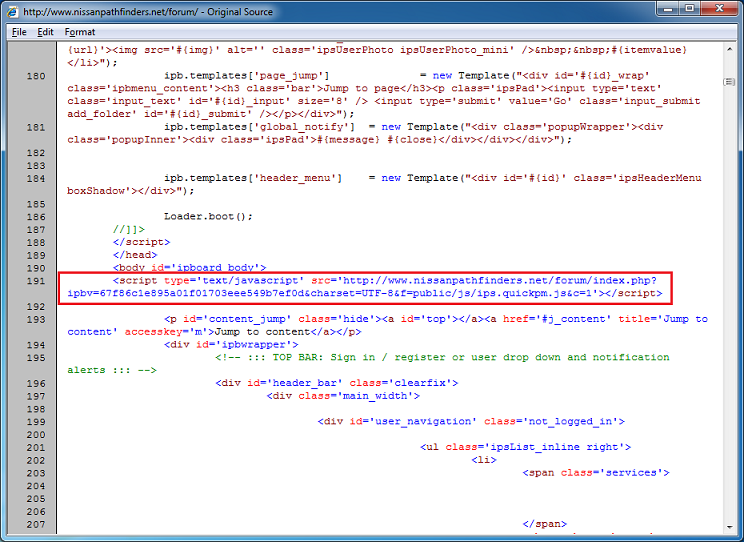
Viewing the source code, this link kicks off the infection:

2013-07-04_02

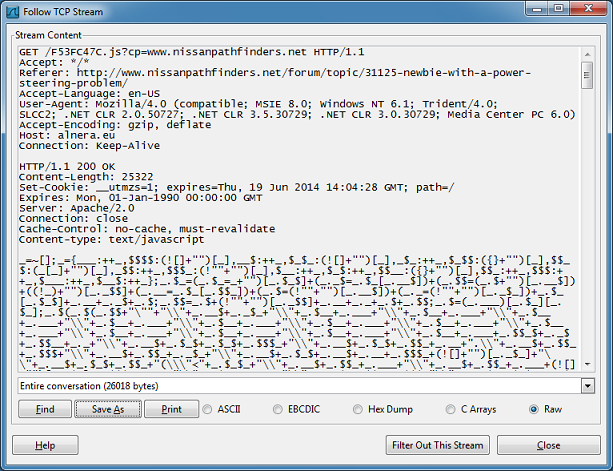
Then from alnera.eu, you end up getting this strange looking Javascript:

2013-07-04_03

What is this? It’s output from JJEncode, a cool script made by Yosuke Hasegawa. It uses only symbols to generate valid Javascript code which, in this case, leads to the compromise of your PC.

2013-07-04_04

There’s a few ways to deobfuscate this script. I’ll show you two ways. Here’s the slow way but this is how you can understand a little of what’s happening.

First make sure you have “<!DOCTYPE>” at the beginning since this only works with HTML 4.0 and above (with IE anyway). If you’re going to use Firefox or other browser then you don’t have to do this. Now search for semi-colons and add a new line in between. Look carefully for the semi-colons in between quotes as you need to leave those alone. What you will likely end up with will look something like this (the bottom portion won’t have any semi-colons to separate on).

2013-07-04_05

Since I’m working on a malicious script, I want to do this carefully so I’m commenting out everything below what I’m working on. There’s an equal sign near the beginning of each line. This indicates that the characters before it is a variable and the characters after is the value. So all I’m doing is “alerting” on the variable so I can see what each line does. Here’s the first one:

2013-07-04_06

Here is the result:

2013-07-04_07

And the second. Notice that I left the first line uncommented. The reason is that it defines the variable “_” so if I comment the first line, nothing will happen on subsequent lines.

Keep going until you reach the line just before the large block of symbols:

The result tells us that this is a function call and if you look closely you at the end of the script, you’ll realize that the major portion of the script is a self-executing function.
So we can just replace “_.$(” with “alert(“:

And we can see the result:

If you want to see how the original code looks like, we can make a change to the very end of the line. From this:

To this:

And then we get this result:

Here’s the second way you can deobfuscate this script. It’s fast and easy but may not work 100% of the time. Just add this to the top like so:

And the final result appears:

Let’s take a look now at the malicious script and applet. The values of the parameters are base64-encoded. The top URL refers to the payload file. The bottom part loads a single Java applet from another URL and a parameter contains a link to the same payload but with a slightly different URL.

This is a new exploit pack that the industry named “DotCacheF” but it looks like they changed the URL format.

The Java applet is not heavily obfuscated but has a low detection rate. Here’s an excerpt of the code that exploiting CVE-2013-2423.

The payload appears to be ZeroAccess.

File: atom.jar
MD5: 912a89f21b7f27404c01c95d18e95d1a
VT: 3 / 46

File: sm_main.mp3
MD5: 8f72a0cb62a01f4fc7ef7064c4b66a8f
VT: 3 / 47

Update (7/25/13): Here’s a Spanish translation of this article here!

Posted in Exploit Packs, Malscript | Tagged , , | Leave a comment

If Computers Were Cars…

Found this on an image site and didn’t see this elsewhere. This is both educational and funny!

Credit to illustrator, imgur.

Posted in Awareness | Tagged , | Leave a comment

Deobfuscating Javascript with Revelo

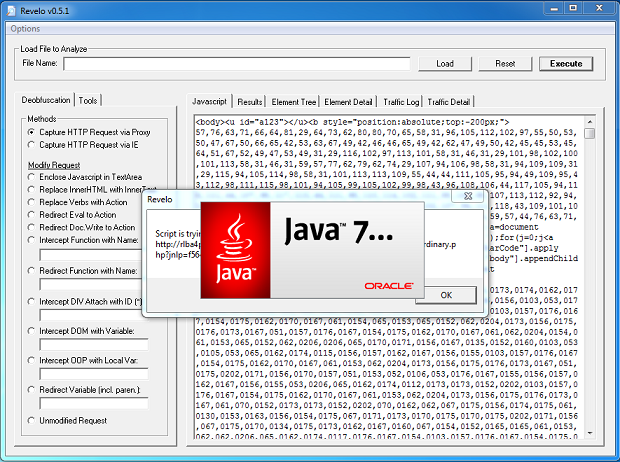
I’ve been getting questions about how to use Revelo so this article will be a refresher on how to use it. You can find the tool here and play along if you like. We’ll be using Revelo to deobfuscate a simple script using free online Javascript obfuscators as practice. (I’m not hating on these tools, they are made by smart developers. All we are trying to do is practice our deobfuscation skills.)

Before we begin, here’s a couple words of caution! Always run Revelo in a virtual machine and disconnect the Internet just in case. Also, when doing a live analysis, remove object tags if you see them. While Revelo will block access to the Internet, external programs like Flash, Acrobat, Java, etc that are called upon by object tags won’t block access and your machine could get infected.

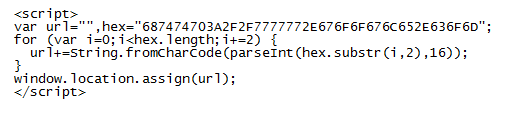
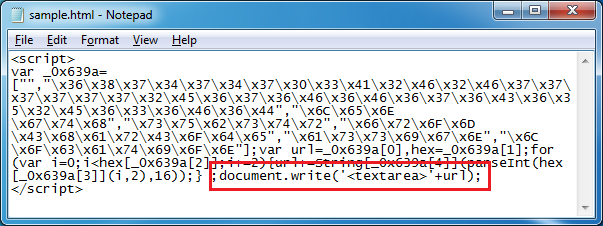
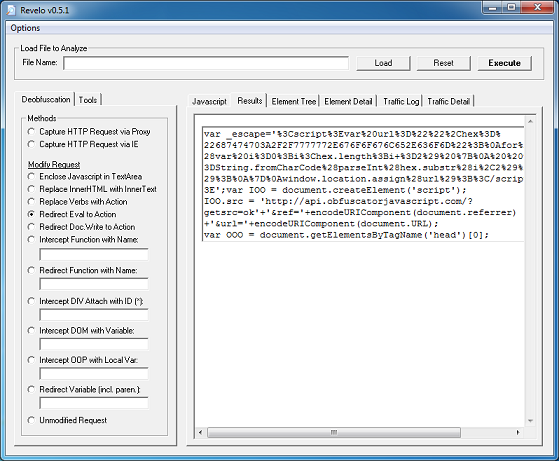
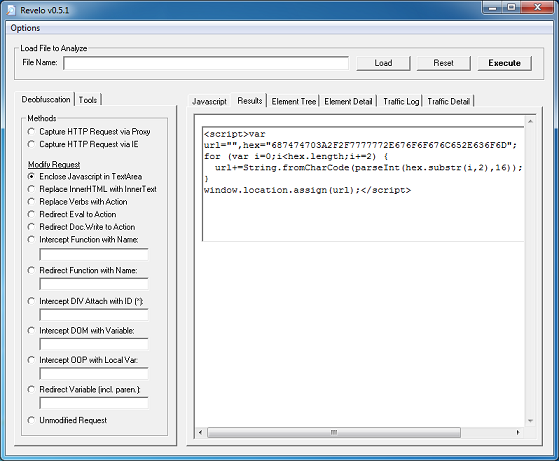
Here’s our very basic script. It takes a string of hex, converts it to text, then redirects you to Google:

2013-06-22_01

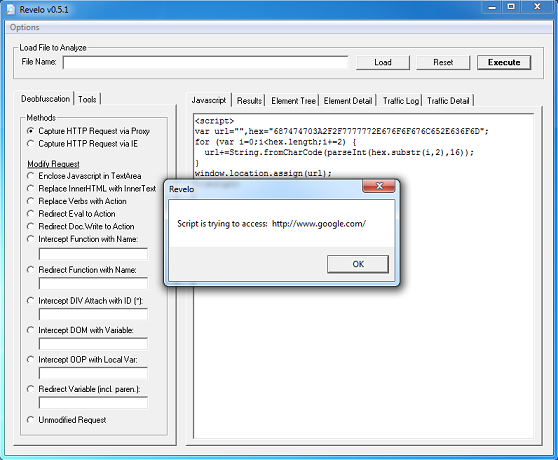
To see what this is doing, paste the script into Revelo, making sure it’s surrounded with < script></script> tags. Click on the “Execute” button. Revelo will execute the code, show you what the script result is, then block its attempt to reach the Internet.

2013-06-22_02

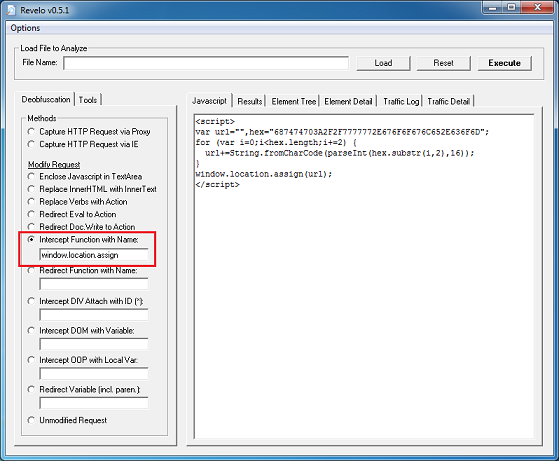
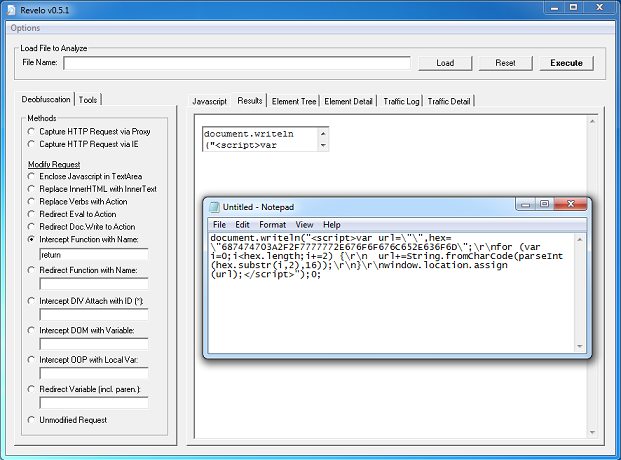
In order to see the final result without having it execute, we need to modify the request (options on the left). The last line of the script gives us a hint, “window.location.assign” followed by “url”. We can intercept that function so copy and paste it into the “Intercept Function with Name” textbox:

2013-06-22_03

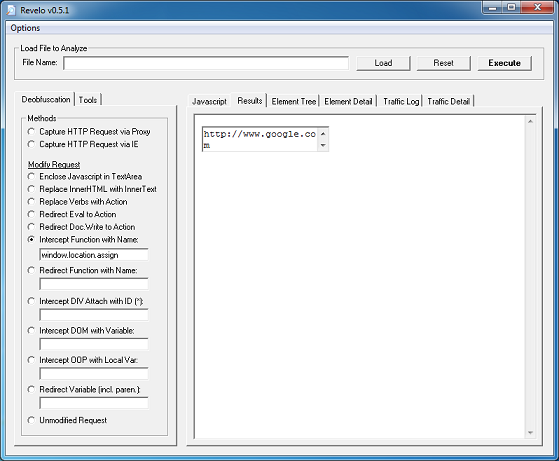
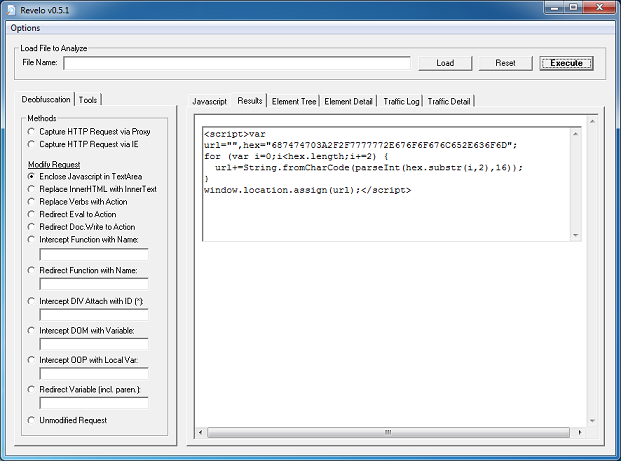
Click on the “Results” tab then click on “Execute” and you can see what the URL is:

2013-06-22_04

Now let’s obfuscate the script further using some online tools…

JavascriptObfuscator.com

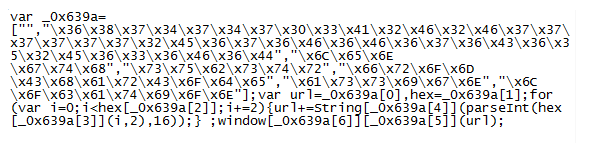
Here’s the output:

2013-06-22_05

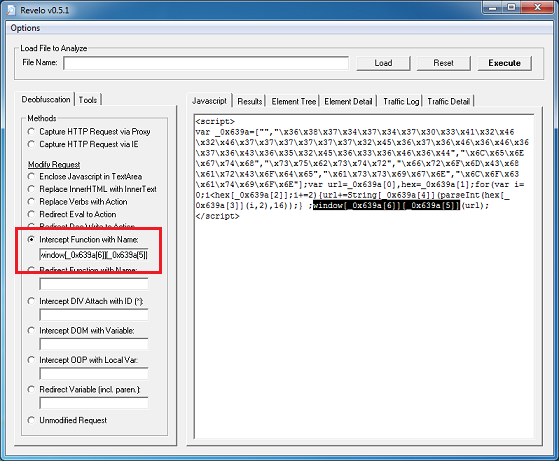
We can see there are a bunch of hex code separated by commas. You can de-hex each array value to figure out what this does, however, just looking at the last line which starts with “window” should be suspicious to you. Since it looks like a function, we can intercept it and send it to a textbox. Copy the highlighted string over to the “Intercept Function with Name” option. What this does is catch the function and display the result without executing it.
2013-06-22_06

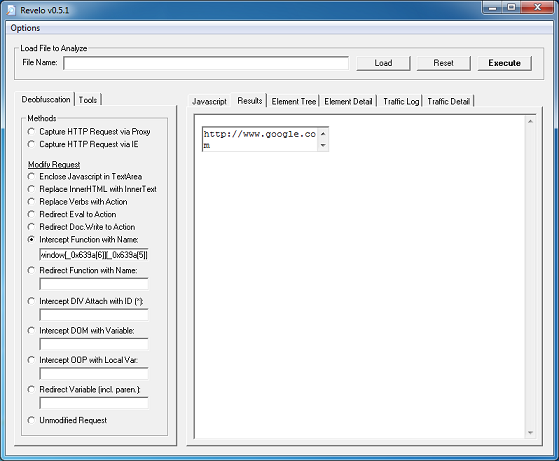
Click on “Results” tab then click on “Execute”:

2013-06-22_07

By the way, you don’t have to use Revelo for any of this. You can simply use Notepad.

2013-06-22_08

www.daftlogic.com/projects-online-javascript-obfuscator.htm

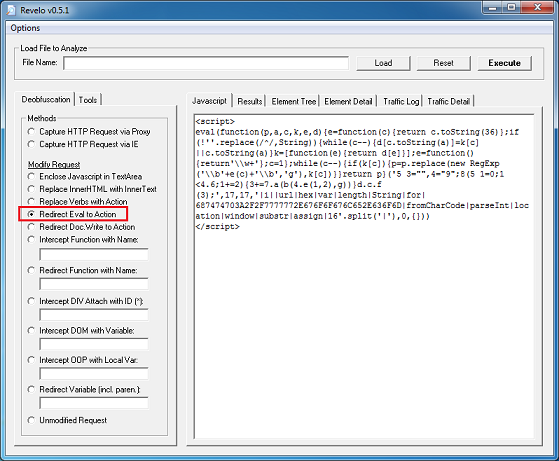
Here’s the output which I pasted in Revelo. Since it starts with “eval”, we can use the “Redirect Eval to Action”. What this will do is change “eval” to “document.write” so it doesn’t execute the result.

2013-06-22_09

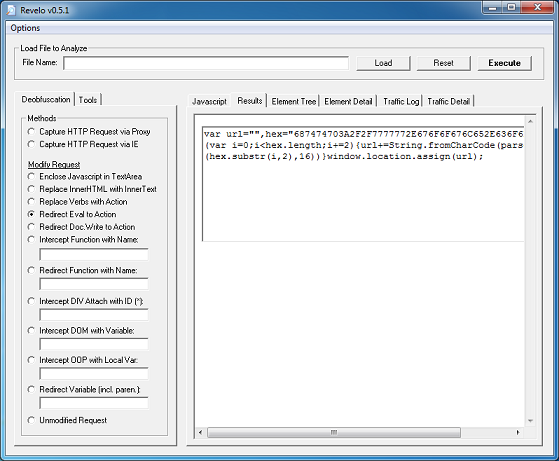
And the result which is our original script:

2013-06-22_10

ObfuscatorJavascript.com

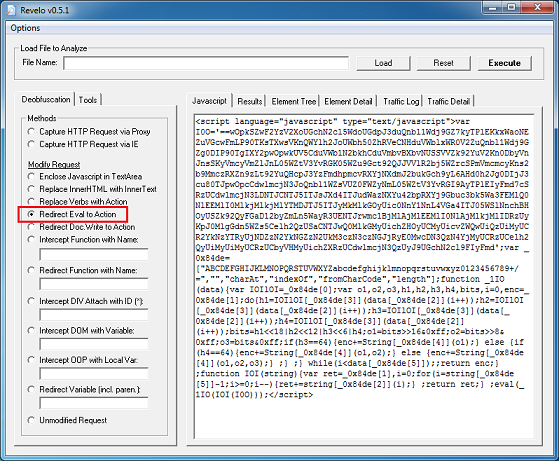
At first glance, this one is a doozy! It seems to have converted the original script as Base64 then reversed it. At the very end, we see “eval” followed by some variables. Let’s try “Redirect Eval to Action”.

2013-06-22_11

The result doesn’t look complete.

2013-06-22_12

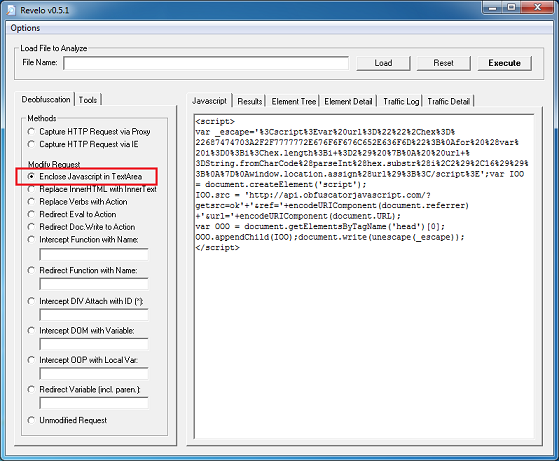
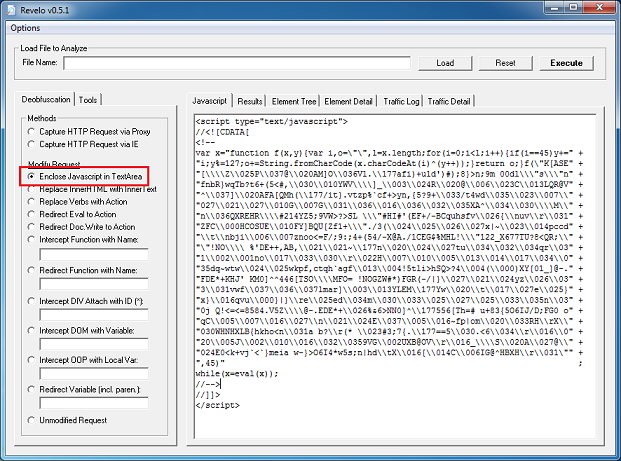
Copy that script and paste it into the “Javascript” tab and let’s do another round. Don’t forget to add the “script” tags. So it looks like the original script is there but it has been escaped. Also, there’s some call to an API on their website. Since it’s using a document.write to render the script, we can try to enclose everything in a textarea so let’s try that.

2013-06-22_13

Cool, it works!

2013-06-22_14

hivelogic.com/enkoder/

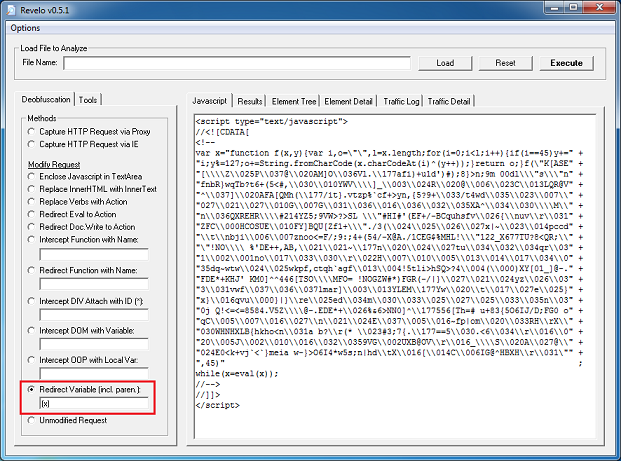
The creator of this script is brilliant! Not only is the obfuscation tricky, it looks cool. It’s logical + artistic. We’re gonna have to put our thinking caps on for this one!

At the end of the script, you see an “eval(x)” call. Let’s redirect the variable so enter “(x)” (including the parenthesis) to “Redirect Variable”. Revelo will display the value of the variable and not execute it.

2013-06-22_15

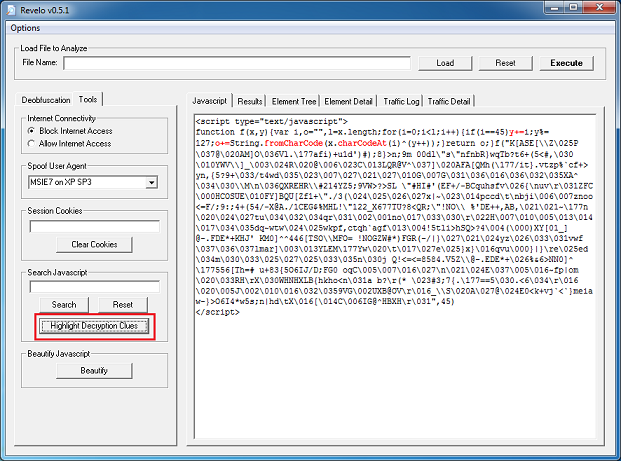
On the “results” tab, we get the result, now copy that to the main tab. (I just pasted it in between the existing script tags.) We can see that it’s a function and does some funky math. We need some help here. If you go to the “Tools” tab, there’s a “Highlight Decryption Clues” button. Click on it. This highlights certain keywords that may be helpful to us.

2013-06-22_16

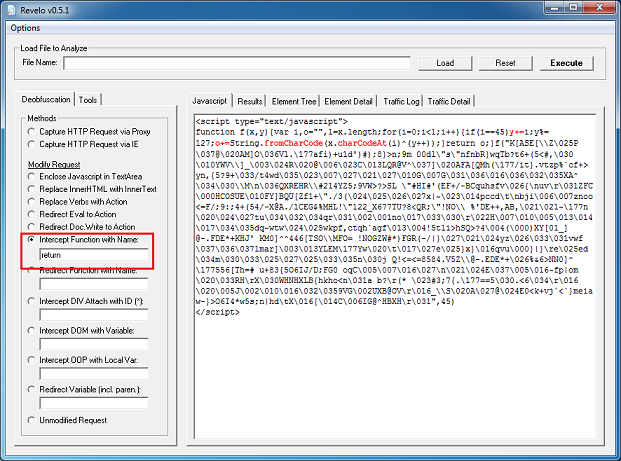
The “y” variable is storing “i” which is a counter for the loop so that’s not important to us. The “fromCharCode” and “charCodeAt” tells us there is a conversion from decimal to text and that “o” is an accumulator of the result. Aha! If we look a little further, we can see that the result of “o” is returned to the caller of the function. Let’s peek into “o” so we need to intercept that. Type in “return” in the “Intercept Function with Name” field.
2013-06-22_17

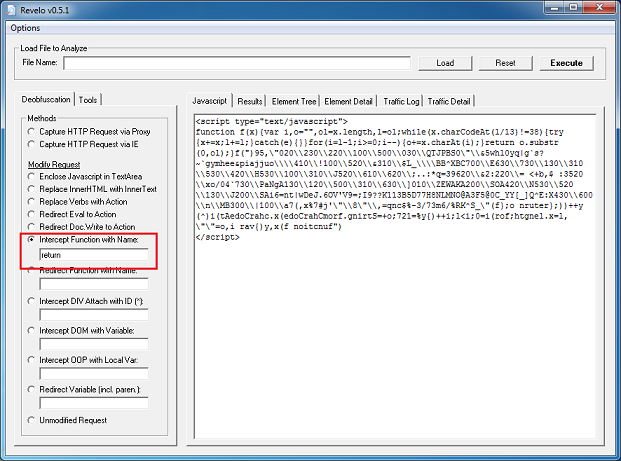
We get the result and paste that to the main tab. Looking at the code, it’s doing the same thing but this time it’s returning a substr of the result. Let’s use “return” one more time.

2013-06-22_18

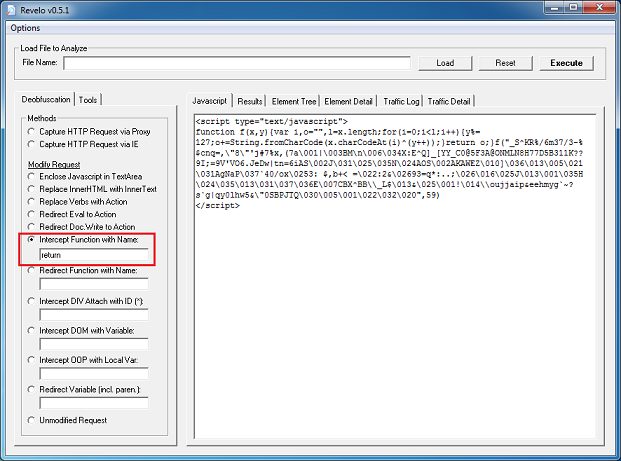
Wow, another layer of obfuscation! Again, we get the result and paste it to the main tab. Looks to be doing it again.

2013-06-22_19

Finally, we get the deobfuscated result! It’s our script wrapped with document.writeln.

2013-06-22_20

Hey, since it’s using document.writeln, we can do this:

2013-06-22_21

And get the final result in one try:

2013-06-22_22

Blackhole Exploit Kit

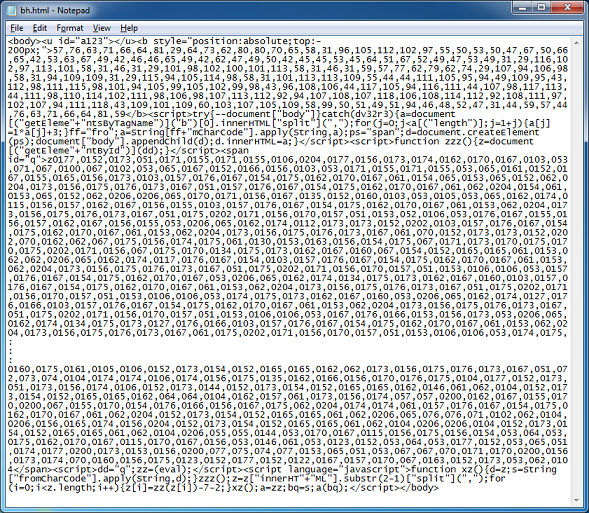
Now let’s try analyzing a real life obfuscated script. This one is from Blackhole’s landing page. You will notice that there are several sets of “script” tags.

2013-06-22_23

If you paste the entire script in Revelo and execute it, you will have a problem! There’s an object tag hidden somewhere in the script that’s calling Java and it could result in your PC getting infected so remember to run everything in a VM. You can also disconnect from the Internet too if you wish to be even more safe.

2013-06-22_24

The best way to analyze this is to do each script separately. Realize that some scripts will call other scripts or use variables from another script so we need to have some understanding of the code but this is the best way I know to handle this safely.

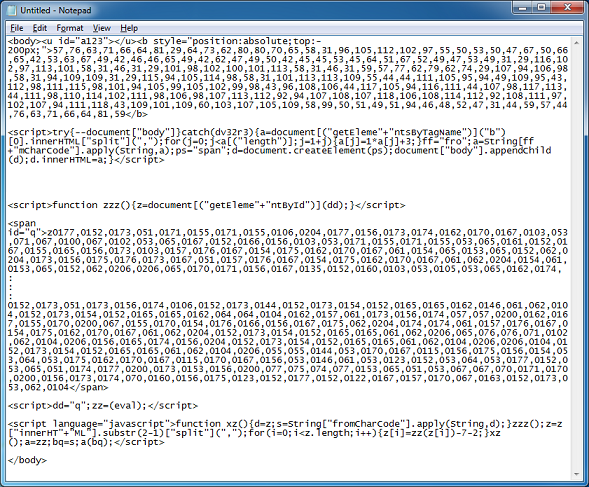
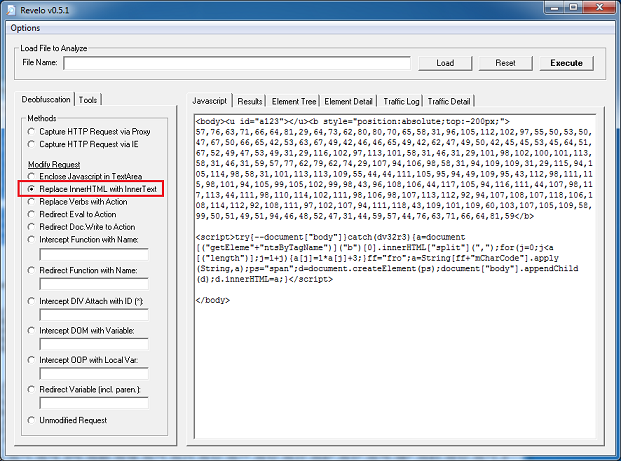
The Javascript code can be separated in two parts. The script near the top is referencing the content between the “<b>” tags. The scripts below reference the content between “<span>” tags.

2013-06-22_25

Let’s do the top portion first. (Note: I added “</body>” to close the open body tag which is up at the top.) We can see that the variable “a” holds the hex values at the top then it gets converted to HTML (e.g. “d.InnerHTML”) and finally appends itself to the body tag (e.g. “appendChild”). Let’s try the option “Replace InnerHTML with InnerText”. By converting this to text, we can see the HTML code but not have it rendered.

2013-06-22_26

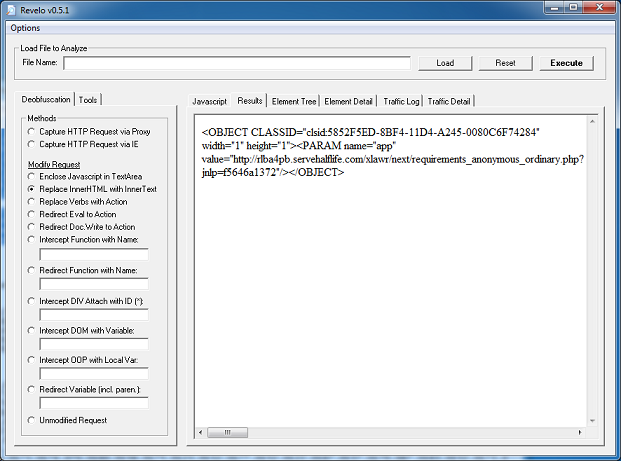
And the results show the call to a Java applet.

2013-06-22_27

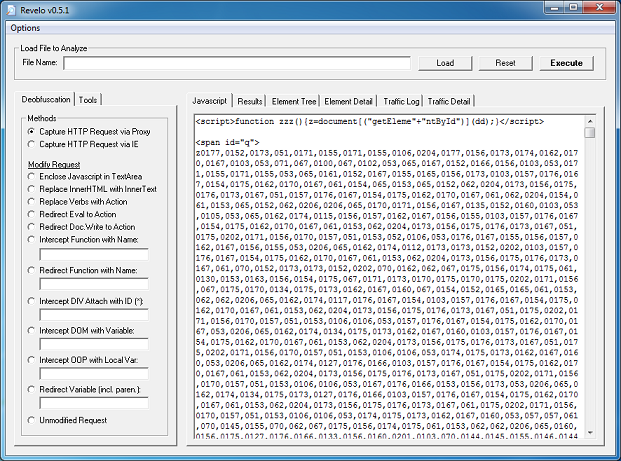
Now for the second part. The script at the top reads in the content of variable “dd”.

2013-06-22_28

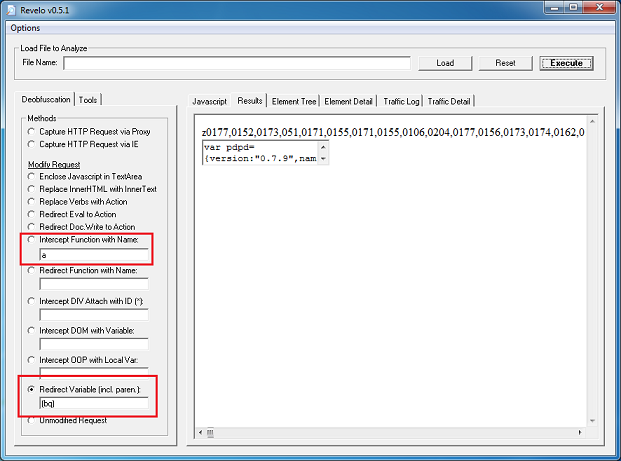
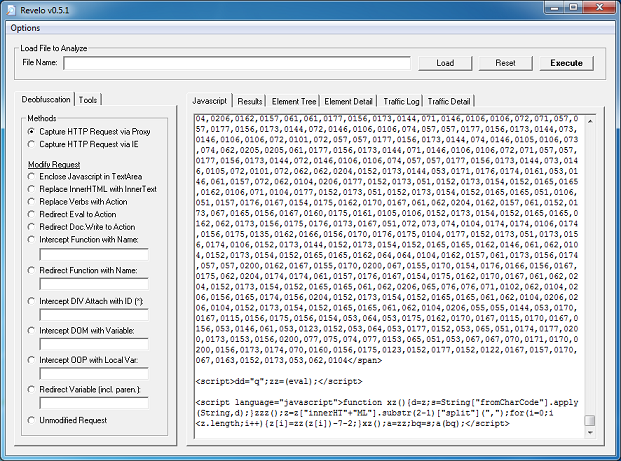
The bottom part shows the value of “dd” is “q” which is the ID of the span container. It also assigns “eval” to variable “zz”. If you follow the last script section, you’ll see that the variable “zz” gets assigned to “a” then the very last statement, “a(bq)”, is actually “eval(bq)”.

2013-06-22_29

So we can either intercept function “a” or redirect variable “(bq)”. Either one works and the result will be the same. Note: The string “z0177, 0152…” is part of the span container and is not the result.

2013-06-22_30

Here’s the deobfuscated script of Blackhole’s landing page.

2013-06-22_31

You’ll find that many malicious scripts will be somewhat easy to deobfuscate. It’s really not worth it for exploit pack authors to spend a lot of time and energy making hard-to-decode scripts. All they need to do is change a simple script often. Look at Blackhole. One of the main reasons for its success is that the landing page script is constantly changing so by the time anti-virus and filtering products detect the script, it’s already updated to something else. And it’s not major changes, just small changes here and there. But that’s enough to get past security defenses.

I hope you better understand Revelo. It does take knowledge of Javascript to utilize the tool well and of course, practice. Have fun and be safe!

Posted in Malscript, Tools | Tagged , , | Leave a comment

Converter v0.8 Released

I added several new features in this release to help you with reverse engineering malicious content. I hope you will find these changes helpful and easy to use! Converter, File Converter, and Data Converter can be downloaded from the Tools page.

Here’s a look at the significant additions made to Converter using live examples…

Mixed Text to Hex
Here’s Neutrino Exploit Kit’s latest obfuscated file:

2013-06-02_01

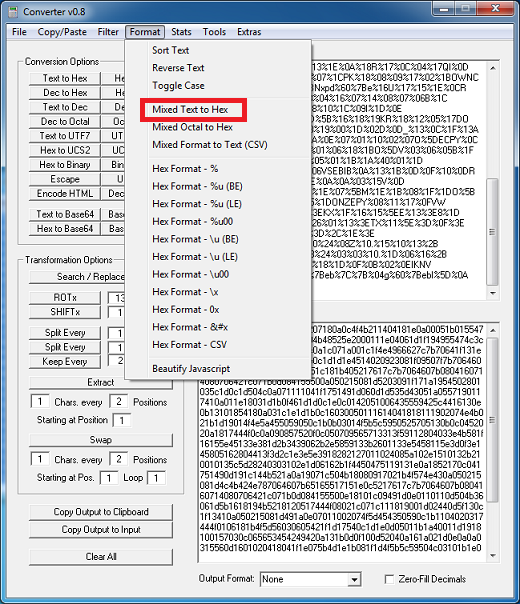
To deobfuscate this, we need to first normalize the input into hex. Just paste the data into Converter then click on Format > Mixed Text to Hex and it’s converted to hex code.

2013-06-02_02

Now we can de-xor the hex code into text:

2013-06-02_03

Pattern Finder
Blackhole’s obfuscation method is pretty challenging since it uses a very long XOR key, 128-bytes to be exact. We can try to brute force this key by finding patterns in the obfuscated payload but that can take awhile. What I’ve done is automated this to some degree. It’s not perfect so you will have to put on your thinking caps and analyze the result. At times you will get a repeating pattern within the result so you will have to remove those bytes to get to the real XOR key.

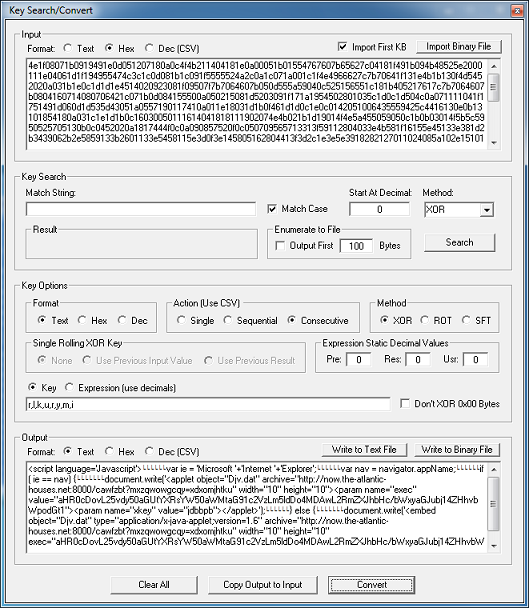
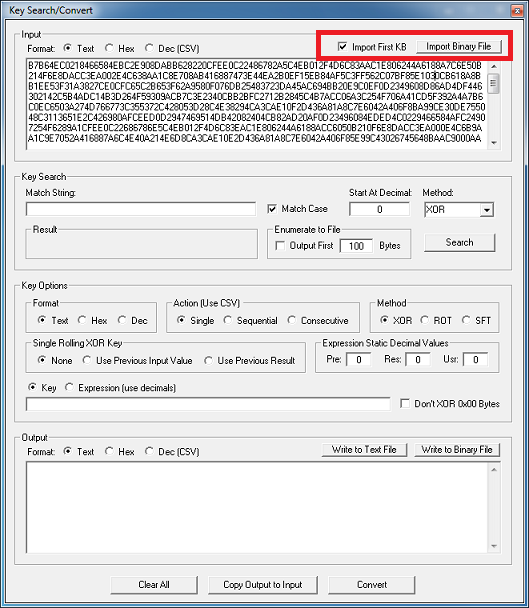
Here’s an example where it does work. 🙂 We use Converter’s Key Search/Convert feature to import the payload file. We really only need the first KB of data so leave the box checked.

2013-06-02_04

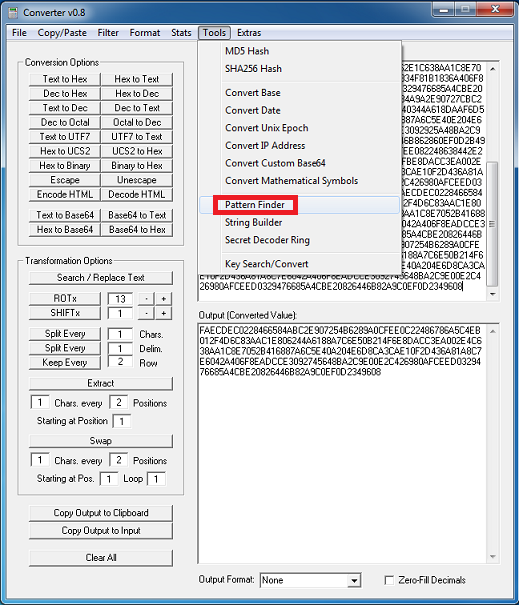
Now copy the hex code and go back to the main screen and paste it in the top box. Now choose Tools > Pattern Finder. It will take awhile but when it’s done, your key will be found. The Stats > Count of Characters says there’s 256 characters (which is 128-bytes).

2013-06-02_05

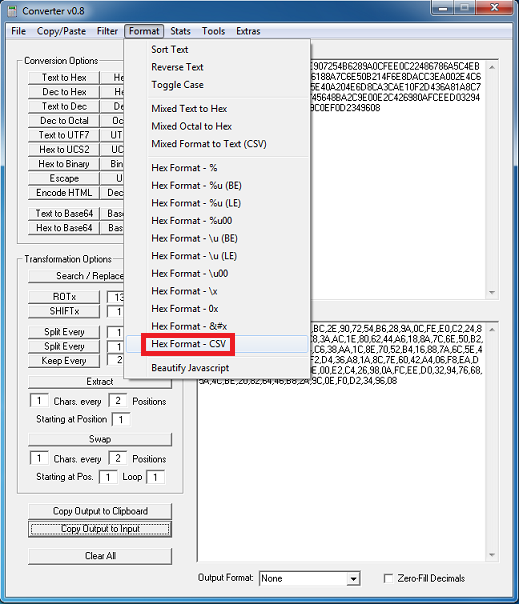
Next we can comma-separate the values by choosing Format > Hex Format - CSV.

2013-06-02_06

Copy the comma-separated key and go back to Tools > Key Search/Convert. Reload the file (just 1KB to test your assumption), select the appropriate options and click on Convert. If all goes well, you’ll get your expected results.

2013-06-02_07

If not, then it might be that the starting byte is wrong. If that’s the case then you need to manually figure out the starting byte by XORing the first value of the input data string (in this case it’s “B7”) with “M” (0x4D) to get the first value. Look for it in your key then make that byte first.

When you figured out the key and the file is small then reload it without the 1KB limitation and convert it. If it’s too big then use File > Convert Binary File and do it from there.

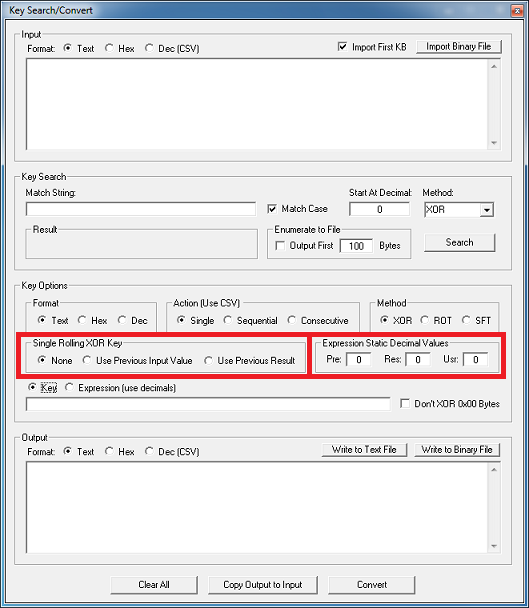
Single Rolling XOR Key
There are some exploit packs that use rolling XOR keys. They use the previous input byte or previous result as the key for the next byte. In this release, I’ve added those capabilities as well as the ability to use them in expressions.

2013-06-02_08

The options for the Single Rolling XOR Key are pretty straight forward, just choose the appropriate option and enter a starting key value. Here’s an example:

Input in Hex: 1122334455
Hex Key: 70

Results of Single Rolling XOR Key:

None (uses same key for input): 6152433425
-> 11 xor 70, 22 xor 70, 33 xor 70, etc.

Use Previous Input Value: 6133117711
-> 11 xor 70, 11 xor 22, 22 xor 33, etc.

Use Previous Result: 6143703461
-> 11 xor 70, 61 xor 22, 43 xor 33, etc.

For handling complicated tasks, we can tap into additional capabilities using expressions. I’ve added a Expression Static Decimal Value section so you can add three starting values:
Pre - previous input value (same as “use previous input value”)
Res - previous result (same as “use previous result”)
Usr - user-defined value

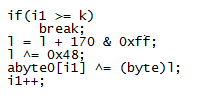
Let me show you an example. This is Blackhole’s routine for deobfuscating the payload:

2013-06-02_09

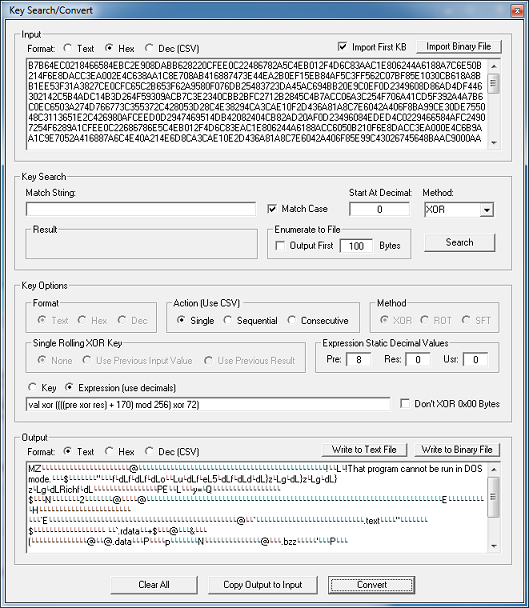
We can replicate this function in Converter using the following expression. You have to manually figure out the first value to get the result of “M” (0x4D) and then enter that into the starting value for “Pre” (or “Res”, in this case).
val xor ((((pre xor res) + 170) mod 256) xor 72)

Here’s the result:

2013-06-02_10

This capability has been added to both the Key Search/Convert and Convert Binary File functions. The standalone File Converter and Data Converter programs have been updated with this capability as well.

Enjoy and thank you for your support!

Posted in Tools | Tagged | 79 Comments